Firefox 2 (Mac + PC)
Detailed Instructions to completely clear the cache for Firefox 2, you can find detailed instructions for Firefox 3 on the Firefox 3 page.


Firefox 2 on the PC
- Step 1
- First click Tools and then Options
- Step 2
- Click on Advanced
Click on Clear Now under Cache
Click on OK - Step 3
- Click the reload current page icon
Check older versions of Firefox
Firefox 2 on the Mac
- Step 1
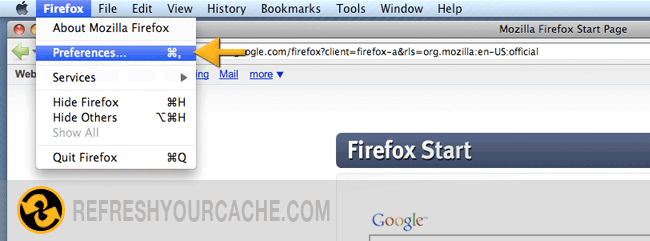
- First click Firefox and then Preferences
- Step 2
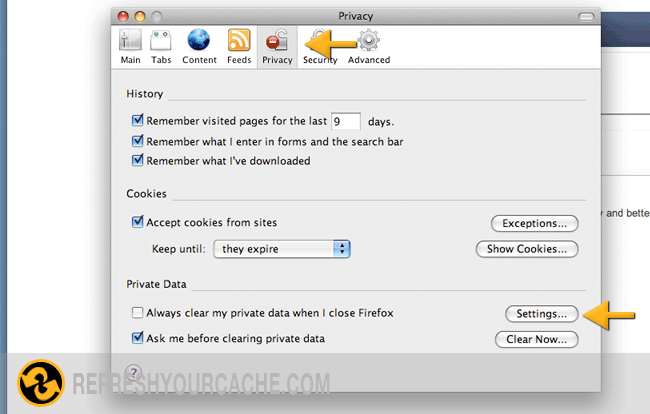
- Click on the Privacy tab and then click on Settings button
- Step 3
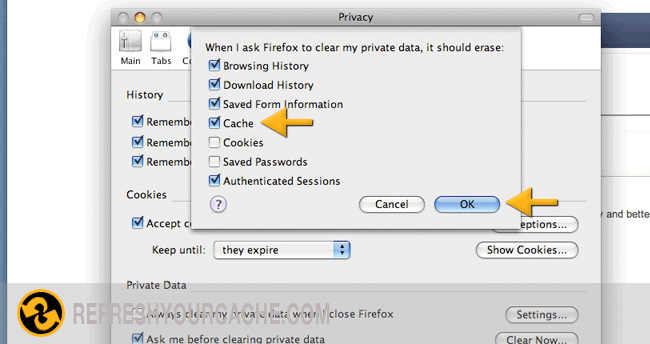
- Make sure you have the Cache option selected (if you want to make sure you don't delete your saved passwords, doublecheck the Saved Passwords checkbox) and then click Ok
- Step 4
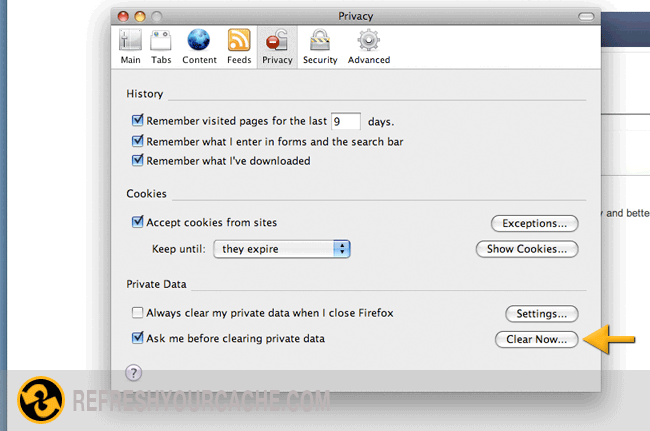
- Click on Clear Now